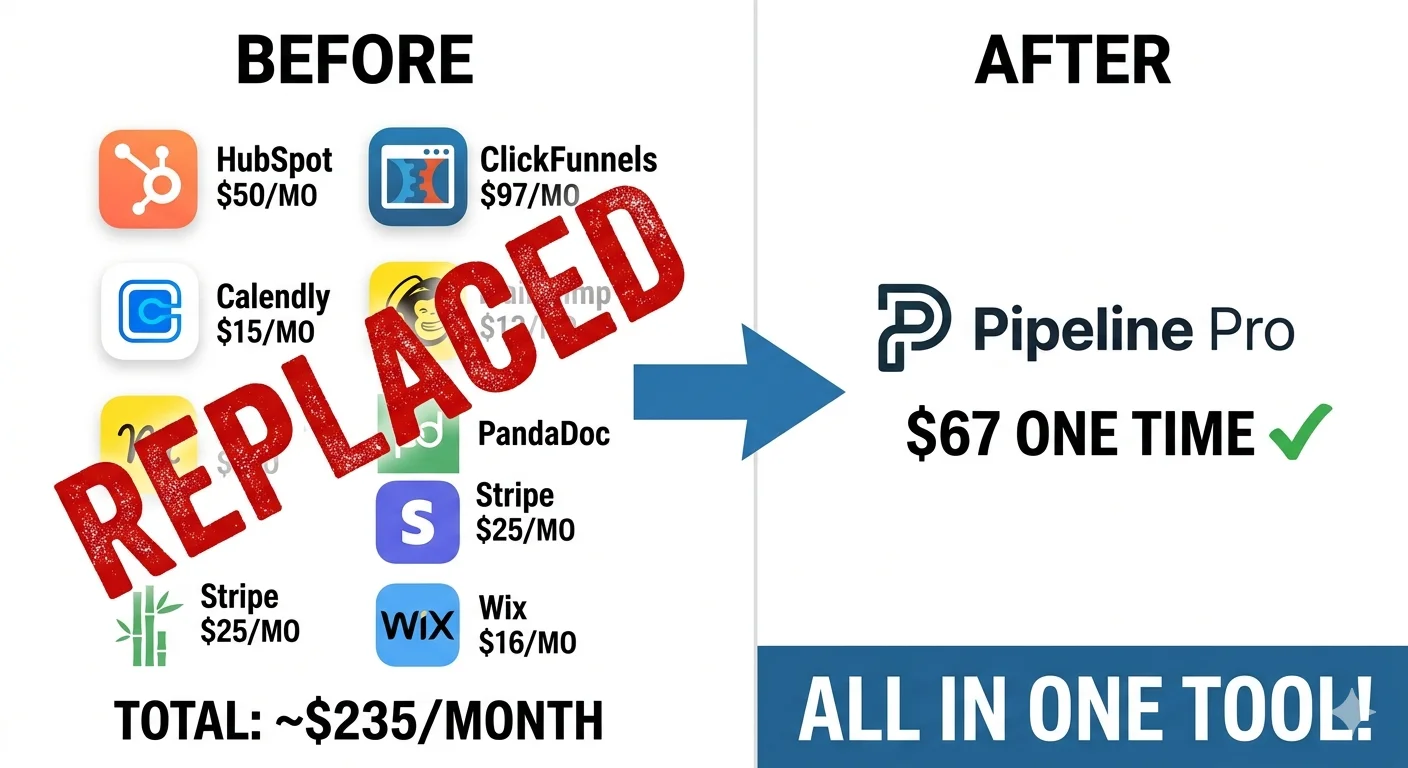
Every week, thousands of small business owners pay for five, six, or even seven separate software subscriptions just to run their sales operation. There’s the CRM. The funnel builder. The calendar tool. The email platform. The invoicing app. The e-signature tool. Add them up, and you’re looking at $300–$500 disappearing from your bank account every single month before you’ve closed a single deal.
Pipeline Pro was built to solve exactly that problem. Launched in the early 2020s and now trusted by more than 30,000 users in 12 countries, it’s an all-in-one sales and marketing platform that promises to replace your entire tech stack with a single, visual dashboard for a one-time payment of $67. That’s not a typo. A lifetime license. No monthly fees. Ever.
In this review, I’m going to break down exactly what Pipeline Pro does well, where it falls short, how it compares to the biggest names in the industry (HubSpot, Pipedrive, ClickFunnels), and most importantly, whether the lifetime deal is genuinely worth it for your business in 2026.
What Is Pipeline Pro? (And Why Does It Exist?)
Pipeline Pro is a cloud-based, all-in-one sales pipeline management and marketing automation platform designed specifically for small and medium-sized businesses, agencies, coaches, and service providers. It was built on the premise that most small businesses are drowning in SaaS subscriptions that barely integrate with one another, and that there had to be a better way. The platform consolidates what typically requires five or more separate tools into a single, unified dashboard:
- CRM & contact management (replaces HubSpot, Keap, Salesforce)
- Sales pipeline tracking (replaces Pipedrive, Monday CRM)
- Funnel & landing page builder (replaces ClickFunnels, Leadpages)
- Calendar & appointment scheduling (replaces Calendly, Acuity)
- Email & SMS automation (replaces Mailchimp, ActiveCampaign)
- Invoicing & e-signatures (replaces PandaDoc, FreshBooks)
- Website builder (replaces Wix, Squarespace)
- Reputation management (replaces Birdeye, Podium)
Founded by sales expert Andrew J. and built on GoHighLevel’s enterprise technology stack, Pipeline Pro has earned recognition from MarTech Outlook Magazine as a Top Marketing Automation Solutions Provider and appeared on the Inc. 5000 list of fastest-growing companies in 2024.
Core Features of Pipeline Pro: A Deep-Dive Breakdown
Pipeline Pro isn’t a CRM with a few extra features bolted on. It’s a genuinely integrated platform where every tool talks to every other tool. Here’s what you actually get inside the dashboard:
1. Visual Sales Pipeline (The Core)
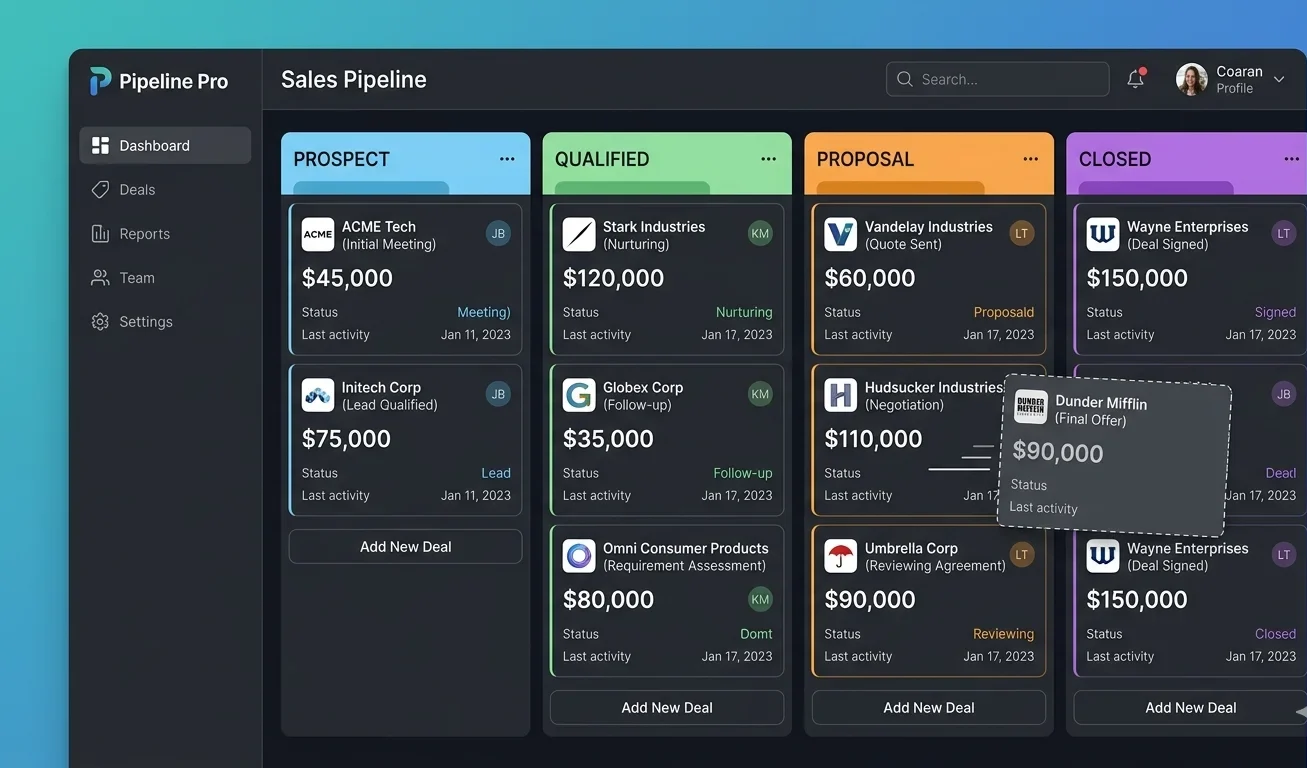
The heart of Pipeline Pro is its kanban-style pipeline dashboard. Every lead is represented as a card that moves through customizable stages from first contact to closed deal. You can see at a glance what’s moving, what’s stalled, and what’s about to close. Deal values are visible on each card, so your total pipeline value is always front and center.
Unlike spreadsheet-based tracking or overcomplicated CRMs, this visual approach means your entire sales team can understand pipeline health in seconds. You can create multiple pipelines simultaneously, which is useful if you run different products or services, and there are no limits on the number of pipelines or contacts you can have.
2. Lead & Contact Management
The Contact Manager stores every detail about a lead: source, tags, funnel they entered through, conversation history, next steps, and progress notes. You can filter and sort contacts in dozens of ways, making it easy to segment your audience for targeted follow-ups. Unlike enterprise CRMs that require a dedicated admin to configure, Pipeline Pro’s contact management is intuitive from day one.
3. Drag-and-Drop Funnel Builder
One of Pipeline Pro’s standout features is its unlimited funnel builder. You can create high-converting sales funnels using a drag-and-drop interface, test offers, track conversion rates, and connect funnels directly to your pipeline and follow-up sequences, all without leaving the platform. Funnels flow directly into your pipeline, so a lead who submits a form on your landing page automatically appears in your CRM, with no manual entry required.
4. Calendar & Appointment Scheduling
Built-in calendar functionality replaces tools like Calendly entirely. Prospects can book calls based on your real-time availability, receive automatic reminder emails and texts, and their appointments appear directly in your Pipeline Pro dashboard. When a call is booked, their contact record is updated automatically, with no copy-pasting between apps.
5. Email & SMS Automation
The platform includes a full email and SMS marketing suite with templates, sequences, and advanced automation triggers. You can set up follow-up sequences that activate when a lead enters a pipeline stage, opens an email, books a call, or completes a form. For businesses where quick follow-up is the difference between a closed deal and a lost one, this capability is genuinely transformative.
6. Website Builder
Need a full business website? Pipeline Pro’s integrated website builder handles it without requiring Wix, WordPress, or any technical expertise. Every site built on the platform connects directly to your forms, funnels, and calendar, so the moment a visitor converts into a lead, they’re automatically captured in your pipeline.
7. Invoicing, Estimates & E-Signatures
Send professional invoices, create estimates, collect deposits, and obtain e-signatures all from inside your Pipeline Pro dashboard. Recurring billing is supported, payment reminders are automated, and signed documents are stored securely. For service businesses, this alone can replace PandaDoc ($19/month) and FreshBooks ($15/month).
8. Reputation Management
Pipeline Pro’s Reputation Manager connects directly to Google Reviews. With one click, you can send review requests to clients, showcase testimonials, and manage your online reputation without a separate platform like Birdeye or Podium.
9. File & Asset Storage
Store videos, PDFs, images, and digital assets directly inside the platform. Files load fast and sync across your sites, funnels, and emails, with no third-party storage tools or extra fees.
10. Mobile App (iOS & Android)
A fully functional mobile app keeps your pipeline accessible from anywhere. Update deal stages on the go, view contact records, send messages, and monitor your pipeline health from your phone with real-time sync to the desktop dashboard.
Pipeline Pro Pricing: The Lifetime License Explained
This is where Pipeline Pro genuinely separates itself from every competitor in the market. While HubSpot charges $50–$800 per month, Pipedrive charges $14–$99 per user per month, and ClickFunnels charges $97–$297 per month, Pipeline Pro offers something almost unheard of in the SaaS world:
What’s Included in the Base License?
The $67 lifetime license covers one user and includes the core CRM, sales pipeline, calendar, landing page builder, website builder, invoicing, reputation manager, file storage, and mobile app. This base package alone replaces tools that cost most businesses $200–$350 per month in subscriptions.
Optional Upgrades
The Marketing Automation Suite is an optional add-on that unlocks unlimited users and contacts (beyond the base), as well as full outbound email and SMS marketing capabilities. For businesses that need multi-channel automation at scale, this upgrade is worth exploring. The specific pricing for this tier varies; contact Pipeline Pro directly for current rates.
Pricing Comparison at a Glance
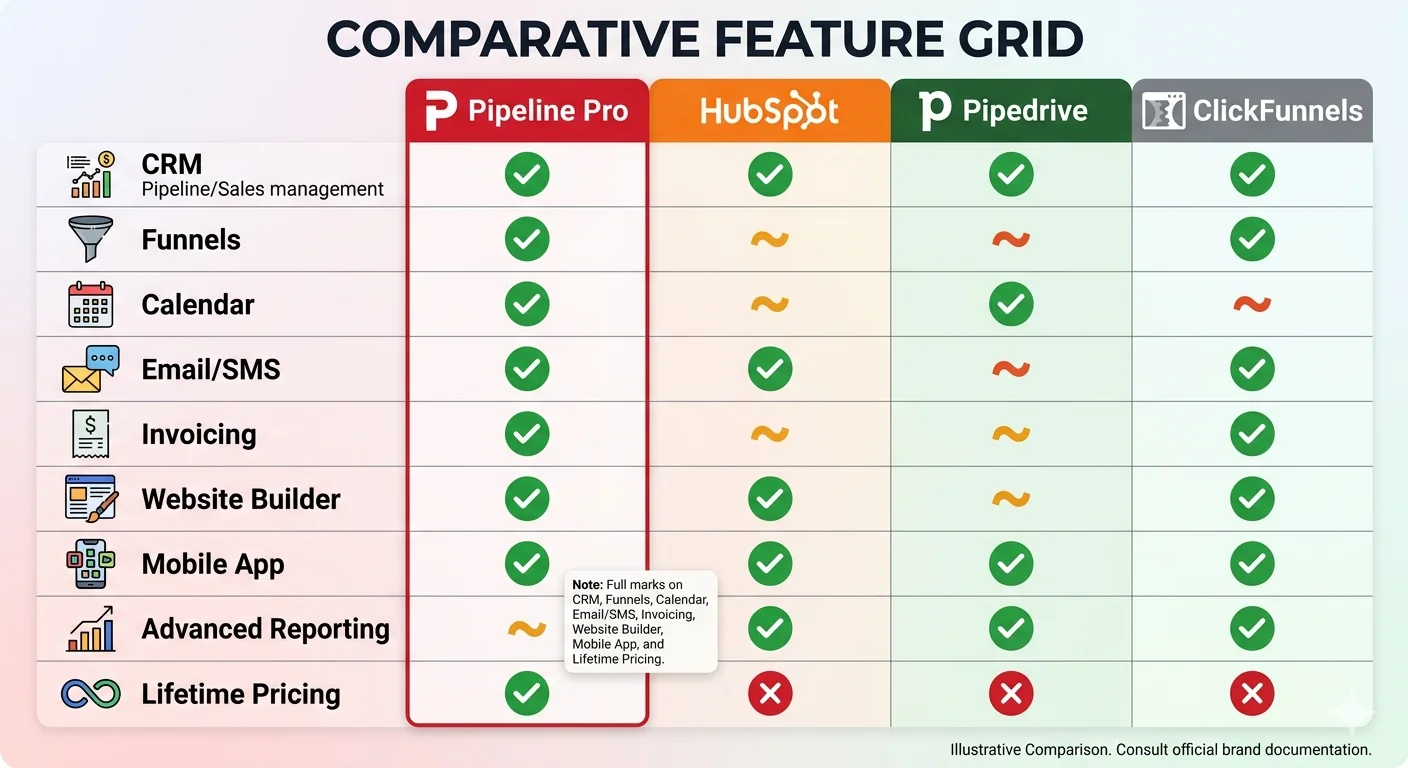
| Platform | Monthly Cost | Annual Cost | Includes CRM | Includes Funnels | Lifetime Option |
|---|---|---|---|---|---|
| Pipeline Pro | $0 (after one-time) | $0 | ✓ | ✓ | ✓ ($67) |
| HubSpot Starter | $50/mo | $600/yr | ✓ | Partial | ✗ |
| Pipedrive Essential | $14/user/mo | $168/yr/user | ✓ | ✗ | ✗ |
| ClickFunnels Basic | $97/mo | $1,164/yr | ✗ | ✓ | ✗ |
| GoHighLevel | $97/mo | $1,164/yr | ✓ | ✓ | ✗ |
Pipeline Pro vs. Top Competitors: Honest Comparison
Let’s go beyond the marketing copy and look at how Pipeline Pro actually stacks up against the tools it claims to replace.
Pipeline Pro vs. HubSpot
HubSpot is the gold standard for SMB CRMs, powerful, polished, and deeply integrated with marketing tools. But it comes at a serious cost. Even HubSpot’s Starter plan runs $50/month, and meaningful marketing automation features require the Professional tier at $800/month. For businesses that don’t need enterprise-level reporting or thousands of API integrations, Pipeline Pro delivers 80% of HubSpot’s core functionality at less than 1% of the annual cost. HubSpot wins on integrations and reporting depth; Pipeline Pro wins on price, simplicity, and consolidated tooling.
Pipeline Pro vs. Pipedrive
Pipedrive is one of the best pure-play pipeline management tools on the market, with a beautiful visual interface and excellent mobile apps. However, it’s a CRM, but it doesn’t include a funnel builder, website builder, invoicing, or email/SMS marketing. To replicate Pipeline Pro’s full feature set using Pipedrive, you’d need to add at least three additional tools. Pipeline Pro is a better choice for businesses that want everything in one place; Pipedrive is a better choice for sales teams that only need a best-in-class CRM and already have the rest of their tech stack sorted.
Pipeline Pro vs. ClickFunnels
ClickFunnels is a funnel builder first, and a CRM second. It’s excellent at creating high-converting landing pages and sales flows, but lacks robust pipeline management and contact management. At $97/month for the basic plan, it’s also significantly more expensive than Pipeline Pro’s one-time fee. If funnels are the cornerstone of your marketing strategy and you need deep funnel analytics, ClickFunnels may offer more specialized capabilities. But for businesses that need both CRM and funnel functionality, Pipeline Pro is the more cost-effective choice.
Pipeline Pro vs. GoHighLevel
This is the most interesting comparison, because Pipeline Pro is actually built on GoHighLevel’s technology. GoHighLevel is a white-label platform typically used by agencies, priced at $97+/month. Pipeline Pro is essentially a pre-configured, consumer-facing version of that infrastructure, offered at a radically lower entry price. The trade-off: GoHighLevel offers more raw customization and native integrations; Pipeline Pro offers significantly lower cost and a more structured onboarding experience for non-technical users.
Getting Started With Pipeline Pro: How Fast Can You Be Up & Running?
One of the most common concerns with any new platform is the setup process. Here’s a realistic timeline for getting Pipeline Pro operational:
Purchase & Onboarding (Day 1, ~1 Hour)
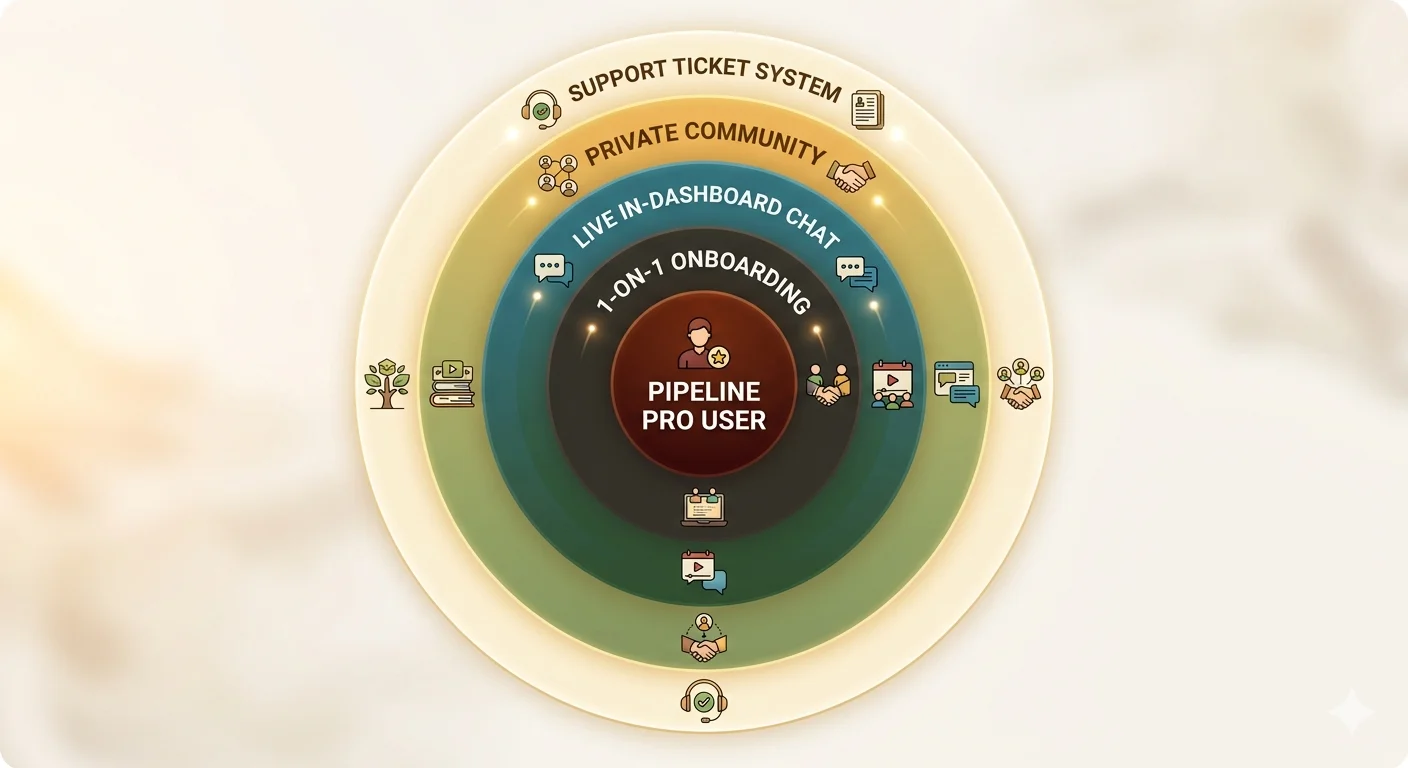
After purchase, you’ll receive access credentials and be guided through a Quick Start checklist. Two tutorial videos walk you through connecting Pipeline Pro to your sales process. Alternatively, a Pipeline Pro technician can set up the dashboard for you for a small fee.
Build Your Pipeline (Day 1–2, ~2 Hours)
Define your deal stages for most businesses, something like: Lead → Qualified → Proposal Sent → Negotiation → Closed Won/Lost. Customize the stages to match your actual sales process.
Import Existing Contacts (Day 2–3)
Import your current leads from a spreadsheet or migrate from your existing CRM. Pipeline Pro’s import functionality handles CSV files cleanly, and you can tag contacts by source, status, or funnel.
Build Your First Funnel or Booking Page (Week 1)
Use the drag-and-drop builder to create a landing page or appointment booking page. Connect it to your pipeline so incoming leads populate automatically, no manual entry required.
Attend Live Training (Ongoing)
Pipeline Pro runs two live weekly training webinars. These are genuinely valuable for learning the platform’s deeper capabilities, from automation sequences to reputation management, and they’re included in your license.
What Real Users Are Saying
User sentiment toward Pipeline Pro is largely positive, particularly among the target demographic of small-business owners and service-based entrepreneurs. Here’s a representative sample from verified reviews:
I literally had 4 different subscriptions to run my business, and now I have one! I had a calendar subscription, a survey builder, a funnel builder, and a CRM. No more. It’s now ALL in Pipeline Pro, works flawlessly, and I’ve eliminated 4 monthly subscriptions that were over $200 combined! – Verified Pipeline Pro User, Independent Consultant
Pipeline Pro has saved my team and me hours each week. It’s improved client retention, enabled us to convert prospects at record speed, and provided a seamless, efficient process for our live events. I wish I had had this system years ago. With my business at a peak of growth, having Pipeline Pro has allowed us to scale with complete confidence – Verified Pipeline Pro User, Events Business Owner
Our challenge has always been visibility into our sales team. I wanted to see EXACTLY how they were following up, when they were doing it, and what tools they were using. Now we can. It’s been a game-changer for team accountability. – Verified Pipeline Pro User, Sales Team Manager
It’s worth noting that some more advanced users, particularly those who eventually wanted to scale significantly and needed greater control over customization, found the platform’s constraints became more apparent over time. The most common upgrade path for users who outgrow the base license is adding the Marketing Automation Suite for multi-channel outbound campaigns.
Integrations: What Connects to Pipeline Pro?
The one notable limitation is that Pipeline Pro does not currently offer native API access. Businesses that require deep custom integrations built by internal developers will need to rely on Zapier or contact the Pipeline Pro team about partnership-level integration options.
While Pipeline Pro’s whole value proposition is that you shouldn’t need to integrate many external tools, the reality is that some businesses have existing workflows they need to maintain. Here’s the integration story:
Native Integrations
Native integrations include InfusionSoft (Keap), OntraPort, and Google (Calendar, Drive, Reviews). Many businesses use these integrations to enhance Pipeline Pro rather than replace their existing CRM entirely, at least at first. Most users eventually migrate fully to Pipeline Pro once they’ve experienced its consolidated capabilities.
Zapier Connectivity
Zapier connectivity extends the reach to 3,000+ external services. If you use a niche tool that Pipeline Pro doesn’t natively integrate with, Zapier almost certainly bridges the gap. This includes project management tools, accounting software, e-commerce platforms, and communication apps.
Security, Privacy & Compliance
For any platform handling customer data, security isn’t optional; it’s essential. Pipeline Pro takes a robust approach:
- Encrypted servers with secure authentication protocols protect all data.
- GDPR compliance is supported, and HIPAA compliance is available via a signed BAA on eligible plans.
- You own your data — Pipeline Pro does not access or resell your contact list.
- Role-based access control lets you assign specific permissions to team members, clients, or departments.
- Cloud-based storage on U.S.-based servers with routine backups to prevent data loss.
- Data export available at any time — contacts, reports, and campaigns can be exported on demand.
- White-label portals available for agency users, supporting custom domains and brand visuals.
Conclusion
After examining Pipeline Pro across every dimension, features, pricing, user sentiment, competitive positioning, support, and security, the verdict is clear for most small businesses and service-based entrepreneurs:
Pipeline Pro is an exceptional value proposition that delivers on its core promise of replacing multiple expensive monthly subscriptions with a single, integrated platform at a one-time cost. The $67 lifetime license is not some cut-rate bargain tool with a shiny interface. It’s built on enterprise-grade GoHighLevel infrastructure, trusted by 30,000+ users across 12 countries, and recognized by industry publications for its innovation.
The combination of unlimited pipelines, unlimited contacts, built-in funnels, calendar scheduling, invoicing, and website building in one platform is genuinely remarkable at any price point, but at $67 once and never again, it borders on unreasonable value.
Frequently Asked Questions (FAQs)
What is Pipeline Pro?
Pipeline Pro is a sales funnel and customer relationship management (CRM) platform designed to help businesses capture leads, automate follow-ups, and manage their sales pipelines more efficiently.
How does Pipeline Pro help with lead generation?
Pipeline Pro provides customizable landing pages, forms, and funnel-building tools that allow businesses to capture and organize leads in one place while tracking user behavior and conversions.
Is Pipeline Pro suitable for small businesses?
Yes, Pipeline Pro is designed for entrepreneurs, coaches, and small to medium-sized businesses looking for an easy-to-use system to manage leads, automate marketing, and improve sales performance.
Does Pipeline Pro offer automation features?
Pipeline Pro includes automation tools such as email and SMS follow-ups, workflow triggers, and pipeline tracking to reduce manual tasks and improve customer engagement.
Can Pipeline Pro integrate with other tools?
Pipeline Pro can integrate with various third-party tools, including email marketing platforms, payment gateways, and analytics tools, helping businesses streamline their operations.